
macOS · Utilities
Twinkeep
Keep one twin. Quarantine the rest.
You know your Mac is full of copies — the same shot, the same download, the same PDF saved twice — but you're not 100% sure what's safe to remove. Twinkeep matches files by their contents, keeps one twin, and quarantines the rest so you can restore anything you still need, or trash it for good when you're sure.
Trial unlocks in-app for 7 days. Prefer a direct license? Buy on Gumroad — $9.99
- Local-only
- No subscription
- Quarantine with restore
- $9.99 once
Requires macOS 13+ · Apple Silicon or Intel · Mac App Store or notarized direct build
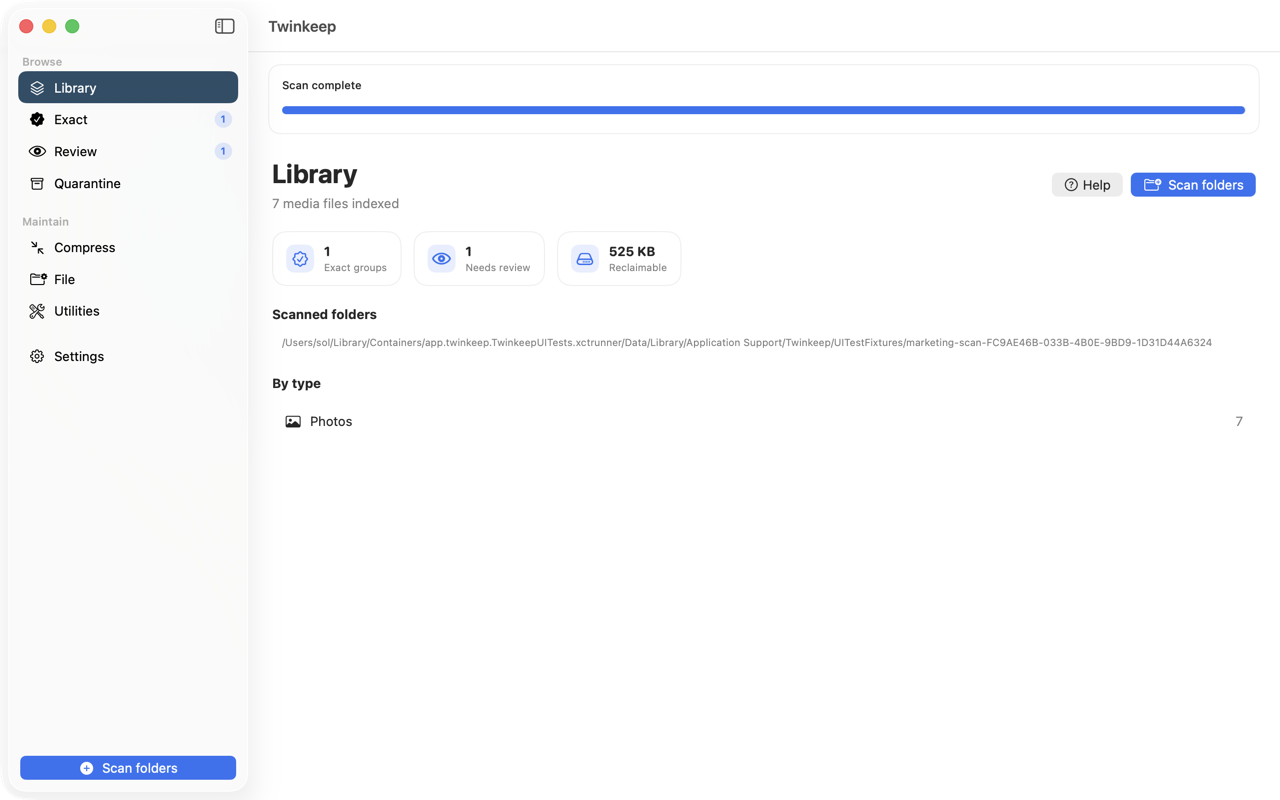
See what Twinkeep found — and how much space you can reclaim.
Keep one twin
Exact duplicates matched by content hash — photos, video and audio out of the box, documents, code or every file once you switch them on. You choose the keeper; extras go to Quarantine, not the trash.
File Rules that watch
Point Twinkeep at Downloads (or any folder). New files auto-file by type and name — the pile stops growing.
Local. One payment.
No cloud upload. No subscription. Maintain utilities for junk, disk, and everyday housekeeping included.
How each feature works
Step-by-step guides for every part of Twinkeep — what it is for, how to set it up, and what it does to your files.
- File Rules File Rules is folder automation built into Twinkeep. Point it at Downloads, your Desktop, or any folder you choose, and new files get filed the moment they land — by type, name, size, age, Finder tag, or whether they're a duplicate.
- Review Review is where Twinkeep sends the photos it will not decide for you — the same shot re-cropped, re-exported, or resaved. It puts two copies on screen at full size, with synced zoom and a strip showing exactly what differs, so you can pick a keeper in about a second.
- Exact duplicates Exact duplicates are files whose contents are byte-for-byte identical, no matter what they are called or where they live. Twinkeep finds them by hashing content rather than comparing names, keeps the best copy, and quarantines the rest for you.
- Quarantine Quarantine is the holding area every removal passes through. Nothing Twinkeep touches goes straight to deletion — it lands here first, with its original location recorded, so you can put it back at any point.
- Junk Sweep Junk Sweep finds regenerable files that pile up in your Library — app caches, logs, Xcode build products, iOS device support, simulator caches — and sorts them by how safe they are to remove.
- Downloads Dust Downloads Dust lists what has been sitting in your Downloads folder longest, with sizes, so you can clear out installers and one-off files you downloaded once and never opened again.
- Disk Analysis Disk Analysis walks your home folders and Applications and reports the biggest space consumers — with libraries collapsed and busy folders rolled up, so you get a readable answer instead of ten thousand files.
- Storage Pulse Storage Pulse is a straight capacity snapshot — total, used, free, and how much macOS is holding as purgeable space it can release on its own.
- Memory Relief Memory Relief lists your running apps sorted by memory footprint and lets you quit the ones you choose. It asks apps to quit the way the Dock does — never force-quits — and reports only what actually closed.
- Stability Stability reads the crash and hang reports macOS already writes, explains them in plain English, and can optionally record a local CPU and memory history so you have evidence about what was happening before a freeze.
What Twinkeep is
Twinkeep is a duplicate file finder for macOS. It matches files by their contents rather than their names, so a copy is caught whatever it was renamed to. Exact duplicates are quarantined for you; only the genuine judgment calls reach you.
Out of the box Twinkeep scans photos, video and audio. Documents, Code and an All file types switch are in Settings, off until you turn them on — turn one on and the same content matching covers PDFs, spreadsheets, Pages documents, source files, or simply everything in a folder. Near-duplicate matching, for the same shot re-cropped or re-exported, applies to photos; every other kind is matched exactly, byte for byte.
The same shot saved four times — once from your camera, once from a text, twice from an export. Twinkeep finds duplicate photos, videos, and audio on your Mac, quarantines the byte-identical extras for you, and brings you only the judgment calls.
It is three tools in one native app: a duplicate file cleaner, File Rules that watch folders and file new arrivals automatically, and Maintain utilities for everyday housekeeping. Everything runs on your Mac. No account, no telemetry, no subscription — one purchase.
You only review what is actually in doubt
Byte-identical files are matched by content, and their extras go straight to Quarantine. A thousand of them take no more of your time than one. Review is kept for the genuine maybes — the same shot re-cropped, re-exported, or resaved — where only you can say which to keep.
When one does need your eye, Twinkeep puts both copies on screen at full size, side by side, with zoom and pan moving together down to 100% pixels and a strip between them calling out exactly what differs: dimensions, file size, format, camera, date. One key decides it.
Nothing disappears
Every removal goes to Quarantine first — never straight to delete. Restore anything, any time, back to exactly where it came from. Browse it as a list, icons, gallery, or filmstrip. Emptying it permanently is the one action Twinkeep will not do without asking.
What we fixed, and why
Version 1.1 is mostly the result of going back through the app and asking what it was quietly getting wrong. Some of it is uncomfortable to write down, so here it is plainly.
- Junk Sweep could delete your crash reports. It listed the folder macOS writes crash and hang reports into as “safe to clean”, and pre-selected it — which meant a routine cleanup quietly destroyed the same reports the Stability tool reads. That folder is now permanently off limits, with a test that fails if anyone ever puts it back.
- Three tools said “nothing found” when they meant “I cannot look”. On the App Store build, Downloads Dust, Disk Analysis and Stability showed empty results when macOS had not granted folder access — indistinguishable from a clean Mac. They now say access is needed and offer to ask for it.
- Memory Relief overstated what it freed. Quitting is a request an app can decline; one with unsaved changes stays open. Twinkeep counted those as freed memory. It now waits to see what actually closed and reports only that.
- File Rules started working before you asked it to. It now ships switched off. Nothing on your Mac moves until you turn it on.
- Folder sizes ignored hidden files, so the amount Junk Sweep promised was less than it actually reclaimed. Totals now include them.
- The background stability monitor rewrote its entire history every minute. Now it appends a line.
None of that is exciting. All of it is the difference between a utility you can trust with your files and one you cannot.
Duplicate cleaning
- Exact duplicates — SHA-256 content hashing finds byte-identical files whatever they are named; extras are quarantined for you automatically, and you can switch that off
- Similar photos — perceptual matching groups the same shot re-cropped, re-exported or resaved, and always waits for your decision
- Photos, video, and audio in one scanner
- Scan any folders you choose, including external drives
- Smart keep policy — prefers Live Photo and HEIC originals over copy-like names, then the older file and the shorter path
- Speed modes and a hash index so rescans stay fast
Compress — space back, without a one-way door
Drop photos, videos or a whole folder. Photos re-encode at the quality you choose; video re-encodes to 1080p, 720p or 480p, using HEVC where the file allows it.
The part other compressors leave vague is what happens to your originals. Twinkeep makes you choose, and says what each choice costs: move them to Quarantine and restore any of them later, move them to the Trash, keep them and free nothing at all, or delete them and get the space now with nothing to restore. Whichever you pick is written next to the button before you press it.
“Just the photo” is the privacy one. A Live Photo carries a few seconds of video — with sound — so sending one can send whatever was being said in the room. This writes the picture on its own at full quality and removes the motion clip, its audio, the depth map and the HDR extras. You can drop the location and camera details too. A video is only treated as the motion clip when it agrees with the photo on Apple’s Live Photo identifier, so an unrelated file that happens to share a name is never touched.
File Rules — the folder that keeps itself tidy
Cleanup apps tidy once. File Rules stops the mess coming back. Point it at Downloads, the Desktop, or any folder you choose, and new arrivals get filed the moment they land — sixteen ways to match, nine things to do, including rules that act on whether a file is already a duplicate of something you keep. Folder automation like this is normally an app you buy separately.
Maintain — everyday Mac housekeeping
- Junk Sweep — caches, logs, and Xcode build junk, sorted by risk
- Downloads Dust — old files still sitting in Downloads
- Disk Analysis — which folders are actually using your space
- Storage Pulse — capacity and free space, including what macOS holds as purgeable
- Memory Relief — which apps are using the most memory, and quit the ones you choose
- Stability — crash reports in plain English, with an optional local CPU and memory history
Requirements
- macOS 13 or later
- Apple Silicon or Intel
Privacy & safety
Every scan runs on your Mac. Nothing is uploaded, there is no account and no telemetry. Keep a current backup of anything irreplaceable before any cleanup tool touches it — Twinkeep moves files you approve, and quarantines exact duplicates automatically unless you switch that off. See the in-app EULA and Disclaimer.
Native SwiftUI · CryptoKit hashing · App sandbox with user-selected folders
Frequently asked questions
Is Twinkeep a subscription?
No. Twinkeep is a one-time $9.99 purchase with no account, no telemetry and no subscription. That price is the same on the Mac App Store and direct.
Is there a free trial?
The direct download from this page includes a 7-day trial that unlocks in the app, after which you enter a license key. The Mac App Store version is a paid app with no trial, so buying there licenses it immediately. Both cost $9.99 once.
Does Twinkeep delete my files?
Not without you asking. Every removal goes to Quarantine first and can be restored at any time to exactly where it came from. Emptying Quarantine permanently is the one action Twinkeep will not do without confirming.
Do my photos get uploaded anywhere?
No. Every scan runs on your Mac. There is no account, no telemetry and no cloud upload of your media. Twinkeep runs in the App Sandbox with access only to folders you select.
How does Twinkeep decide what is a duplicate?
Byte-identical files are matched by SHA-256 content hash regardless of filename, and their extras are quarantined automatically unless you switch that off. Similar photos — the same shot re-cropped, re-exported or resaved — are grouped by perceptual matching and always wait for your decision.
Does Twinkeep find duplicate documents and other files?
Yes, though not until you ask it to. A new install scans photos, video and audio. Open Settings and you can switch on Documents (PDF, DOC, XLSX, Pages, Numbers, Keynote, ePub and more), Code, or All file types, which covers every regular file except hidden and system junk. Those are matched exactly, by a SHA-256 hash of their contents, so a renamed copy is still caught. Near-duplicate matching — near-identical rather than identical — is for photos only.
Can Twinkeep scan an external drive?
Yes. You choose which folders to scan, including folders on external drives, and a hash index keeps rescans fast.
What does Twinkeep require?
macOS 13 or later, on Apple Silicon or Intel.
What is the difference between the Mac App Store and the direct version?
The same app at the same $9.99 price. The direct build is notarized and comes with a 7-day trial plus a license key; the Mac App Store build is a paid app that is licensed the moment you buy it.
Ready to reclaim the space?
One-time purchase. Local on your Mac. Quarantine before anything is gone for good.
Or buy a direct license on Gumroad — $9.99.