macOS · Utilities
PrecisDesk
Capture, record, and arrange
Take the shot, record the walkthrough, and put every window where it belongs — without stitching three apps together. Everything runs on your Mac.
- Runs entirely on your Mac — nothing you capture is uploaded
- No account, no subscription, no analytics or advertising SDKs
- Native for Apple Silicon and Intel
- $9.99 once
Requires macOS 14+ · Apple Silicon or Intel · Mac App Store
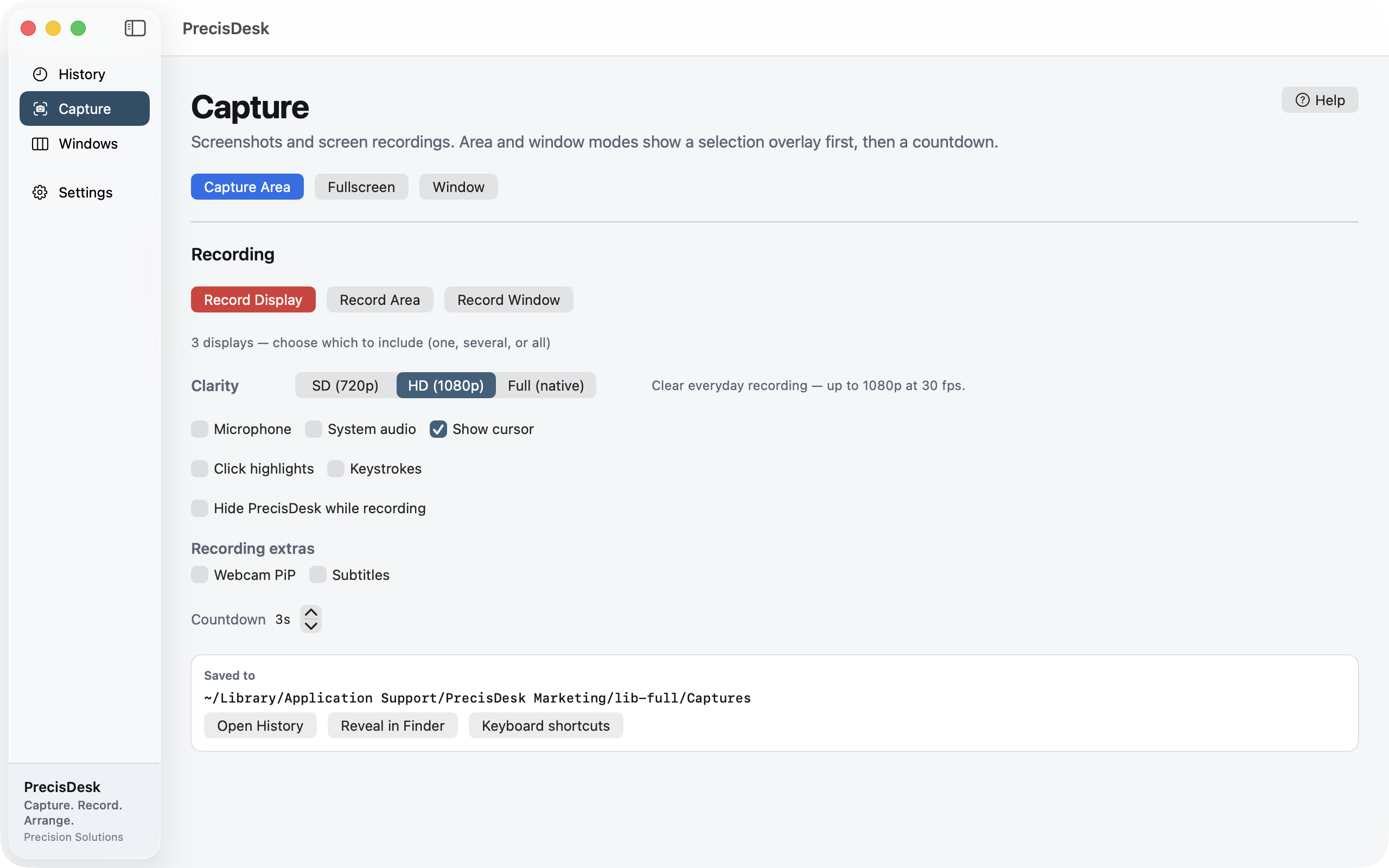
Capture an area, a window, or a whole screen.
How each feature works
Step-by-step guides for every part of PrecisDesk — what it is for, how to set it up, and what it does to your files.
- Screenshots Pick a region with the crosshair, click a single window, or grab an entire display. Every shot lands in a Quick Access overlay where you can annotate it, copy it, or send it somewhere — before it ever becomes a file you have to go looking for.
- Screen recording Record a display or a region to MP4, with your microphone and the audio coming out of your Mac. Turn on click highlights and on-screen keystrokes when you are recording a walkthrough, and hide PrecisDesk itself so it never appears in the video.
- Clip editor Drag the blue handles to trim, or mark a section in the middle and remove it. The preview switches between Edited and Original so you can check what you actually cut before you commit, and nothing touches the source file until you save.
- Webcam picture-in-picture Record your camera alongside the screen and decide where it goes later. Move it between corners partway through, resize it, make it a circle, give it a border, or hide it entirely for the sections where nobody needs to see you.
- Captions and subtitles Turn the words in your recording into captions using on-device speech recognition — no upload, no account, no per-minute fee. Fix the wording, retime any line, and either burn them into the exported video or save a separate .srt.
- Window snapping Halves and quarters, thirds and sixths, size cycling and grid placement — each with a keyboard shortcut, and a visual palette when you would rather point at where the window should go.
- Saved layouts Undock your laptop and every window piles onto the built-in screen — and stays piled when you plug back in. PrecisDesk remembers the arrangement for each set of monitors you use, and restores it when that set comes back.
- Window switcher Command-Tab switches apps. When you have nine windows open across three of them, that is not the question you are asking. The Switcher shows every window as a live preview, grouped by app, with search — and you can set up to nine shortcuts, each showing a different set of windows.
- Annotate and redact Mark up a capture with arrows, boxes, freehand and text. Blur or pixelate anything that should not be shared. Then pull the text straight out of the image with on-device OCR, or lift an exact colour with the picker.
- Capture history Screenshots and recordings in one list with thumbnails, filterable by type. Reopen anything in the editor, reveal it in Finder, or select a batch and delete it. Set a retention period and old captures clear themselves.
What PrecisDesk is
PrecisDesk (PREH-sis-desk) is a screen capture, screen recording and window manager for the Mac, in one native app. Take a shot, record a walkthrough, or put every window where it belongs — without learning three separate tools.
Everything runs on your Mac. Nothing you capture is uploaded, there is no account, and there are no analytics or advertising SDKs.
Who it’s for
Mac users who live in screenshots, demos and multi-monitor layouts — support and QA teams, founders recording walkthroughs, and anyone who docks a laptop and rebuilds their windows twice a day.
Capture
- Capture an area, a single window, or a whole screen
- Quick Access overlay after every capture — annotate, copy, print, reveal or delete
- Save folders you choose and filename templates you control
- History of every capture, filterable, with a retention period
Annotate and redact
- Crop, arrows, lines, shapes, freehand, text, highlighter and step counters
- Spotlight, blur and pixelate — redaction applied to the exported image, not drawn on top
- On-device OCR (Apple Vision) to copy text out of any capture
- Colour picker in hex or RGB
- Non-destructive projects, plus PNG export
Screen recording
- Record a display or a region to MP4, or export an animated GIF
- Microphone and system audio, independently switchable
- Cursor, click highlights and on-screen keystrokes for walkthroughs
- Pause and resume — pauses are stitched out, not frozen into the file
- Hide PrecisDesk while recording so the app never appears in the video
Webcam picture-in-picture
- Burn the camera in as you record, or place it afterwards in the editor
- Any corner or anywhere you drag it, in a circle or a rounded rectangle, with a border
- Move it partway through so it never covers what matters, or hide it for a stretch
Captions
- Generate captions from the recording’s own audio, on-device (Apple Speech)
- Edit the wording and retime any line
- Burn them into the video, or export a separate
.srt
Clip editor
- Trim the ends, cut sections out of the middle, split and mute
- Compare Edited against Original before you commit
- Non-destructive — your source recording is never overwritten
Windows
- Halves, quarters, thirds and sixths, maximize, centre and grid placement
- Keyboard shortcuts for everything, plus an on-screen snap palette and drag-to-edge zones
- Put my windows back — remembers your arrangement per set of monitors and restores it when a display is unplugged and plugged back in
- Saved per-app layouts, size cycling, ignored apps, and gaps between tiled windows
- Switcher with live window previews, grouped by app, with search and up to nine of your own shortcuts
- URL commands such as
precisdesk://snap/leftHalf
Privacy and permissions
PrecisDesk asks for Screen Recording, and — only if you use those features — Microphone, Camera, Speech Recognition, and Accessibility for moving other apps’ windows. You can decline or revoke any of them; features that depend on a permission you decline simply do not run.
Requirements
- macOS 14 or later
- Apple Silicon or Intel, native
Frequently asked questions
Does PrecisDesk upload my screenshots or recordings?
No. Captures, recordings, text recognition and speech recognition all run on your Mac. There is no account system and no media server.
Why does it need Accessibility permission?
Moving and resizing another app’s windows requires the macOS Accessibility permission. Decline it and the capture and recording features still work — only window management needs it.
Can it put my windows back after I unplug a monitor?
Yes. PrecisDesk remembers your arrangement for each set of displays and can restore it when that set comes back. It ships switched off, because it moves windows you did not ask it to move.
What does it cost?
$9.99, once. PrecisDesk is a one-time purchase on the Mac App Store — no account and no subscription.
What does it run on?
macOS 14 or later, native on Apple Silicon and Intel.
Where can I buy PrecisDesk?
On the Mac App Store. Unlike Twinkeep, there is no direct or Gumroad build of PrecisDesk yet.
Ready to take the shot?
One-time purchase on the Mac App Store. Everything runs on your Mac — nothing you capture is uploaded.