macOS · Utilities
Assay
Open any file. Know what converting it keeps.
Assay opens the files macOS can’t, shows you what they really are, and converts them with a report of exactly what was kept — checked by reading the result back, not guessed.
- Free to view any file and convert pictures
- Runs entirely on your Mac — nothing is uploaded
- No account, no subscription
- Assay Unlock: $19.99 once
Requires macOS 14+ · Apple Silicon or Intel · Mac App Store
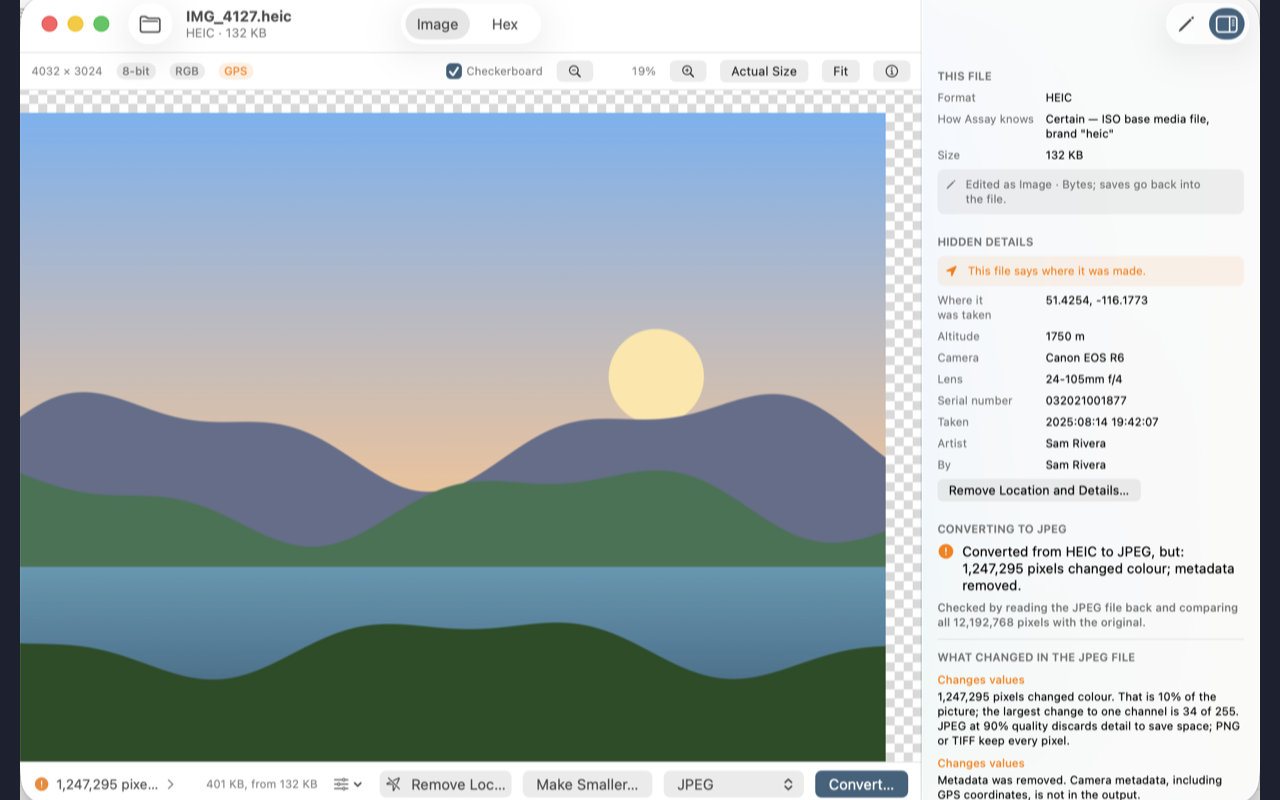
Convert HEIC to JPG for free — see the size before you save, and take the location out on the way
How each feature works
Step-by-step guides for every part of Assay — what it is for, how to set it up, and what it does to your files.
- Open winmail.dat on a Mac A winmail.dat is not a broken file. It is how Outlook packs an email's formatting and attachments, and Apple Mail cannot unpack it. Assay opens it for free: you see the message and save every attachment inside.
- Convert HEIC to JPG on a Mac iPhones save photos as HEIC, and plenty of websites, forms and Windows PCs still want JPG. Assay converts HEIC to JPG — or PNG, WebP, TIFF and more — for free, shows you the size before you save, and never uploads your photos.
- Stop Excel removing leading zeros Open a CSV in Excel and 02134 becomes 2134, a 16-digit account number ends in zeros, and “3-4” becomes 4 March. The CSV was fine; opening it is what changes it. Assay shows you every value Excel would change, for free, and converts the file so Excel cannot.
- Remove location from photos Most phone photos record exactly where they were taken. Send one, post it, or attach it to a listing and that location goes with it. Assay shows what a photo gives away and removes it — free — without recompressing the picture.
What Assay is
Assay opens any file on your Mac, tells you what it really is, and converts it to what you need — then checks the result. It reads the formats macOS leaves you stuck with: dBASE tables, SQLite databases, Outlook .msg messages, mailboxes, old spreadsheets from SYLK and DIF to Lotus 1-2-3, TOML, JSON Lines, 7-Zip archives and more.
A conversion you can check
Every conversion is written, read back with the destination’s own reader, and compared with the original. When a format cannot hold something — leading zeros in a ZIP code column, a line break in a cell, transparency in a JPEG, a table wider than Word allows — Assay says so, counts it, and tells you which format would keep it. “Nothing lost” is only said when the result was read back and matched.
What it does
- Identifies files by their contents, not their name, and says when the extension is lying.
- Shows every file the way it wants to be read — tables, trees, documents, messages, archives, pictures, 3D models, sound and video, and the raw bytes.
- Converts between tables, trees and documents — CSV, Excel, SQLite, JSON, YAML, TOML, XML, property lists, HTML, Markdown, RTF and Word — keeping headings, lists, links, pictures, types and key order where the destination can hold them.
- Edits in place, changing only the bytes you changed: a cell in a CSV keeps every other line exactly as it was.
- Converts many files at once — drop files or whole folders in the Batch window. Assay converts and checks them all first, so you see exactly what you will get before anything is saved.
- Works from Finder and Shortcuts — space-bar previews for formats macOS cannot show, Open in Assay and Convert with Assay… on the right-click menu for one file or many, and Shortcuts actions to convert, make smaller, remove location and identify files.
Free tools, no unlock needed
- Convert pictures — HEIC to JPEG, WebP to PNG and every other picture format, with no limit. Choose the quality and see the size before you save.
- Make Smaller — fit a photo or PDF for email, Messages and WhatsApp, a web page, or Discord and Slack, or set your own size.
- What Is This File? — Assay tells you what any file really is and saves a correctly named copy when the name is wrong.
- Open winmail.dat — see the email and save its attachments, the files Outlook hides from Mac users.
- Remove location and hidden details — take GPS, camera, author and other details out of photos, PDFs and Office files before you share them. Photos keep every pixel exactly.
- Open a CSV in Excel safely — Assay warns you when Excel would strip leading zeros, round long numbers or turn text into dates, and shows the safe way.
- Export or copy the report of what a conversion keeps, as Markdown, a web page or plain text.
Coming soon in Assay 1.0.2
The next update is with Apple for review now:
- Try any conversion free — your first three conversions of any kind (CSV to Excel, web page to PDF, Outlook message to text and the rest) will be free, with the full check of what was kept. Picture conversions, Make Smaller, removing location and opening winmail.dat stay free for good.
Private by design
Assay runs entirely on your Mac. Your files are never uploaded, there is no account, and there are no analytics. Anything a web page, Markdown file or email uses from the web stays blocked until you choose to load it, one file at a time — so tracking pixels stay quiet.
Frequently asked questions
What does it cost?
Assay is free to download on the Mac App Store. Viewing any file, converting pictures, Make Smaller, What Is This File?, opening winmail.dat and removing location are free. Converting other formats, editing, and saving batches of files are unlocked by Assay Unlock, a one-time $19.99 in-app purchase — not a subscription.
How do I remove the location from a photo on a Mac?
Open the photo in Assay and choose Remove Location and Details. Assay lists the GPS position, camera and date details the photo carries and saves a copy without them — without recompressing the picture, so every pixel stays the same. It is free.
How do I convert HEIC to JPG on a Mac for free?
Open the HEIC photo in Assay, choose JPEG as the destination and click Convert… Picture conversions are free with no limit: you choose the quality, see the file size before you save, and can remove the photo’s location at the same time. Nothing is uploaded.
Does Assay upload my files?
No. Everything happens on your Mac. Assay loads nothing from the web on its own: when a web page, Markdown file or email refers to pictures online, they stay blocked until you choose to load them.
Can Assay open winmail.dat files?
Yes, for free. Assay shows the email inside a winmail.dat — the subject, the message and who it was from — and lets you save its attachments.
Can it convert a PDF to Word?
No, deliberately. A PDF is a drawing of pages, and a Word file rebuilt from one would not look like the original. Assay converts a PDF to its words as plain text, or to pictures of its pages that look exactly like it.
Open the file you’re stuck on
Free on the Mac App Store. Viewing, picture conversion, Make Smaller and location removal are free for good; Assay Unlock adds converting other formats, editing and batches for $19.99 once. Everything runs on your Mac.