Twinkeep feature guide
Quarantine: nothing is gone until you say so
Quarantine is the holding area every removal passes through. Nothing Twinkeep touches goes straight to deletion — it lands here first, with its original location recorded, so you can put it back at any point.
What it's for
The reason people hesitate over duplicate cleaners is simple: what if it is wrong? A tool that deletes is a tool you have to trust completely before you have any reason to.
Quarantine removes that problem. Every file Twinkeep acts on — an exact duplicate it cleared for you, a photo you rejected in Review, a file a rule filed away — moves here, keeping a record of exactly where it came from. Restoring puts it back in that exact place.
Nothing leaves your Mac, and nothing is permanently deleted until you choose to empty it.
How to use it
-
Open Quarantine
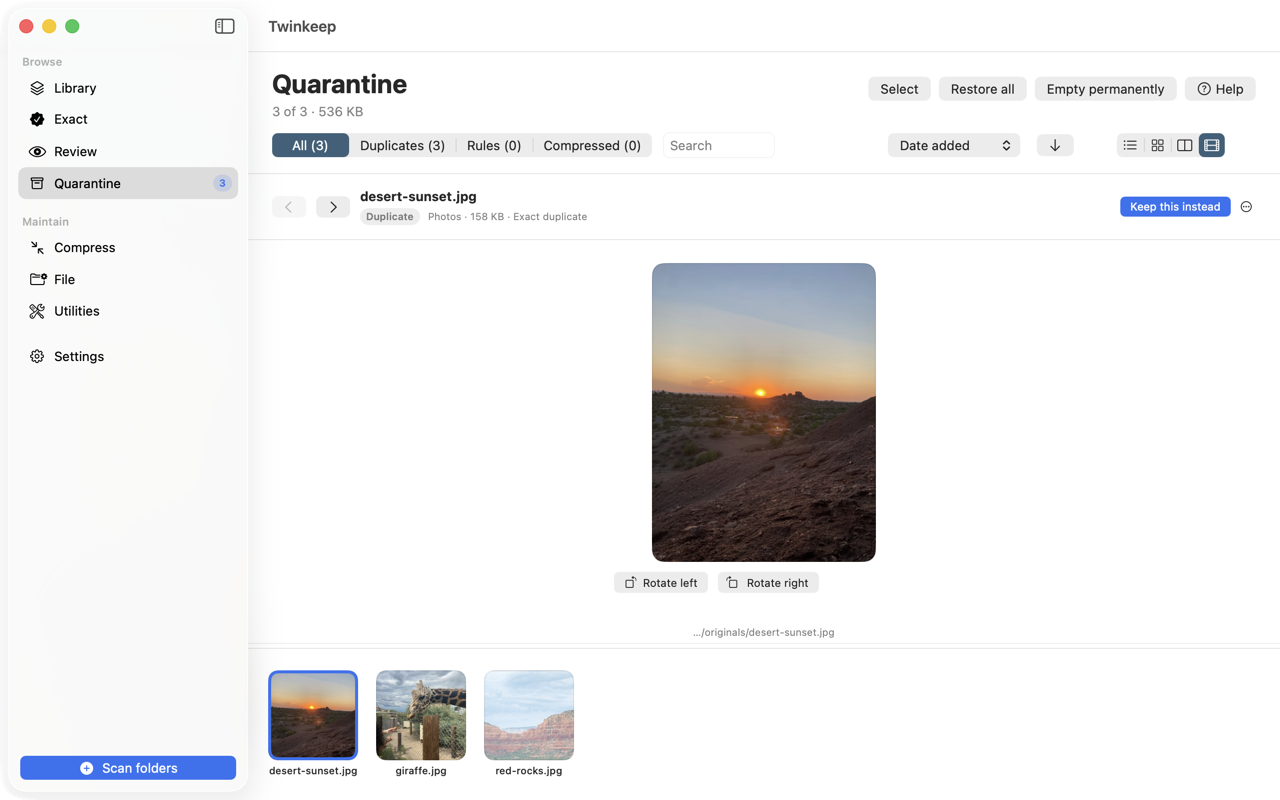
The sidebar badge shows how many files are being held and how much space they represent. Filter by All, Duplicates, Rules, or Compressed to see what put each file here.
-
Pick a view that suits the job
Four views: List for detail and paths, Icons for scanning quickly, Gallery for a large preview beside the list, and Filmstrip for one big preview above a scrolling ribbon of everything else. Drag the ribbon divider to resize it.
-
Check before you decide
Selecting a file shows its full metadata: type, size, when it was quarantined, why, and which file was kept instead. Rotate previews if a photo came in sideways, or press Open to view it in Preview.
-
Restore anything you want back
Restore returns a file to its original path. Keep this instead goes further — it restores this file and quarantines the one Twinkeep kept, swapping the decision.
-
Keep them somewhere you can reach
Quarantined files sit in Twinkeep’s own folder by default. Settings → Quarantine folder points them at a folder of your own instead — an external drive, a cloud folder, anywhere — and Move to Folder… parks just the ones you select. They stay listed in Quarantine either way, and Restore still puts them back where they came from.
-
Empty when you are sure
Empty permanently is the only action in Twinkeep that cannot be undone, so it always asks first. Until then, quarantined files stay on your disk.
What ends up here
- Exact duplicates cleared automatically after a scan
- Photos you rejected in Review
- Files a rule quarantined — for example old installers
The Source column tells you which, so a file filed by automation is never confused with one you chose yourself.
Restore is exact, not approximate
Twinkeep records each file's original path when it quarantines it. Restoring recreates that location, including the folder, rather than dropping the file somewhere generic. If the original folder is gone, Twinkeep recreates it.
Where the files are kept
Out of your way by default: quarantined files live in Twinkeep's own folder, so a holding area full of duplicates never clutters the folders you work in. If you would rather have them to hand, point Quarantine at a folder of your own in Settings, or move a selection to any folder from the Quarantine screen. Files kept in a folder of yours get their real names rather than an internal one, and scans skip whatever folder is holding them, so quarantined copies never turn up again as fresh duplicates.
It is not a backup
Quarantine protects you from Twinkeep's decisions, not from disk failure. It lives on the same drive as your files. Keep a real backup — Time Machine or otherwise — before any cleanup tool touches anything.
Common questions
Where do quarantined files actually live?
By default, inside Twinkeep's own folder on your Mac. They are not in the Trash, so emptying the Trash does not touch them. You can also point Quarantine at a folder of your own in Settings, or move individual files to any folder you like — they stay listed in Quarantine, and either way they never leave your machine.
Does quarantine free up disk space?
Not until you empty it. Quarantined files still occupy space — that is the trade for being able to undo. Empty permanently once you have confirmed you do not need them.
What does \u201cKeep this instead\u201d do?
It swaps the decision: the quarantined file is restored to its original location and the file Twinkeep had kept is quarantined in its place. Useful when you disagree with the keeper it chose.
What if I delete a quarantined file myself?
Twinkeep notices. The row stays, marked Missing, and offers Remove instead of Restore — there is no file left to put back. Its size stops counting toward what Quarantine is holding, and one click clears every row like it. Twinkeep never removes those rows on its own: a row vanishing by itself would be exactly the behaviour Quarantine exists to avoid.
Can I get a file back after emptying Quarantine?
No. Emptying permanently deletes, which is why it is the one action that always asks for confirmation. Restore anything you are unsure about before emptying.
Try it on your own files
Twinkeep is a one-time $9.99 purchase — no subscription, no account, and nothing leaves your Mac. Requires macOS 13+.