PrecisDesk feature guide
Window snapping: put a window where you want it, from the keyboard
Halves and quarters, thirds and sixths, size cycling and grid placement — each with a keyboard shortcut, and a visual palette when you would rather point at where the window should go.
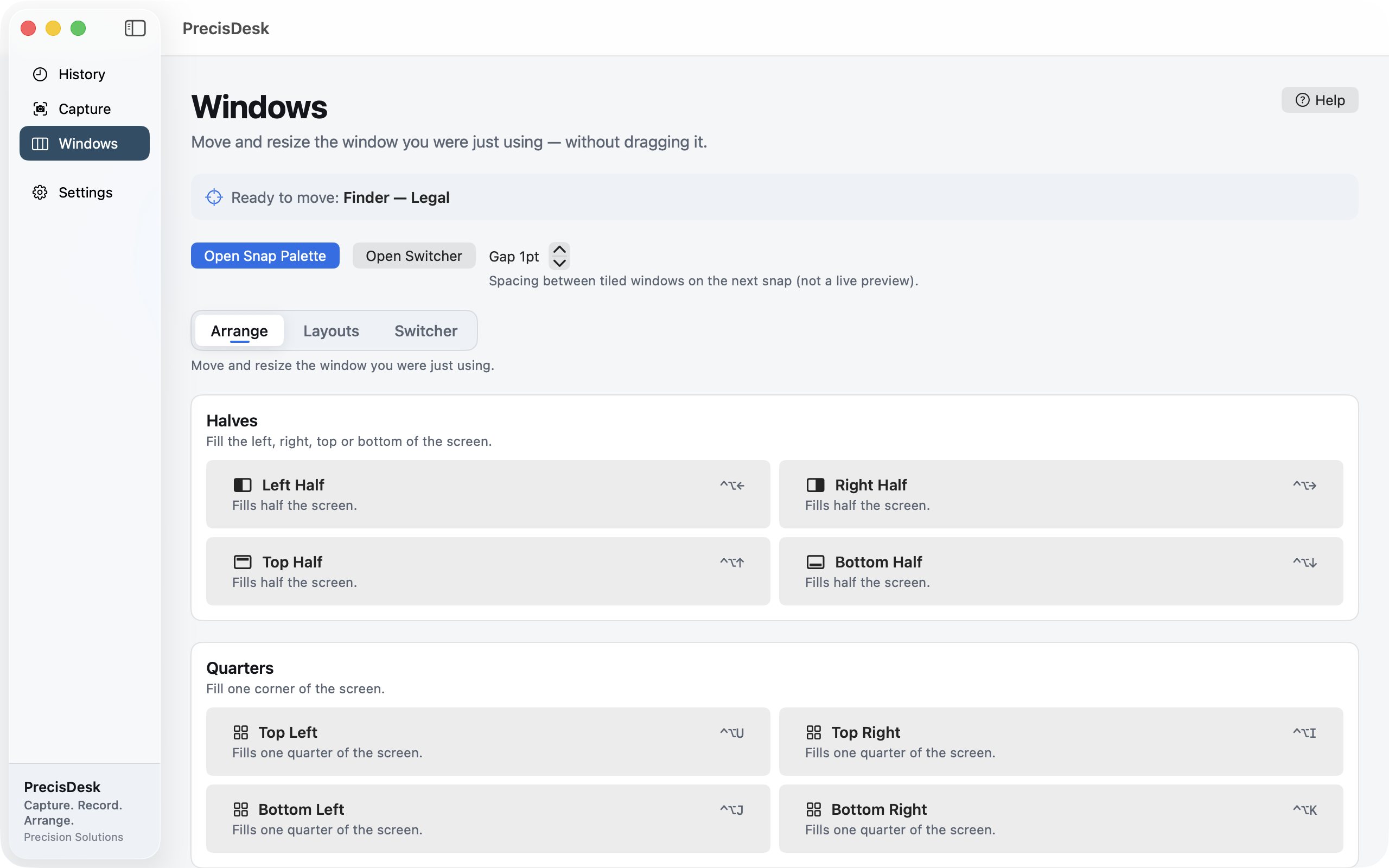
What it's for
Dragging a window to exactly two-thirds of the screen is a fiddly, repetitive job, and you do it a hundred times a week.
PrecisDesk gives every arrangement a shortcut. The window you were last using goes where you say — left half, top-right quarter, centre third — without touching the mouse. Thirds and sixths are where it earns its keep: three windows side by side, or two-thirds plus a third, are the layouts a wide monitor is actually good for.
Prefer the mouse? Open the snap palette and click the position you want, or drag a window to a screen edge and drop it into a zone.
How to use it
-
Pick the window
PrecisDesk acts on the window you were last using. The Windows tab shows which one that is, so there is never any doubt about what is about to move.
-
Snap it
Use the shortcut — ^⌥← for the left half, ^⌥→ for the right, ^⌥↑ and ^⌥↓ for top and bottom, and the same pattern for quarters.
-
Reach for thirds on a wide screen
Thirds and sixths put three windows side by side, or two-thirds of the screen next to a third. This is what a wide monitor is for.
-
Cycle sizes with one key
Press the same shortcut again and the window cycles through related sizes, so one key covers several arrangements.
-
Use the palette when you would rather point
Open Snap Palette shows every position as a target you can click. Drag-to-edge snapping works too, if that is the habit you already have.
Positions
- Halves — left, right, top, bottom
- Quarters — all four corners
- Thirds and sixths — including two-thirds and five-sixths
- Maximize, nearly full screen, centre
- Grid placement, and moving a window to the next display
Ways to trigger it
- Global keyboard shortcuts, all remappable
- The on-screen snap palette
- Drag a window to a screen edge or corner
- The menu bar icon, without leaving the app you are in
- URL commands like
precisdesk://snap/leftHalf
Common questions
Does it need Accessibility permission?
Yes. Moving another app's windows requires the macOS Accessibility permission — that is the only way any window manager can do it. PrecisDesk asks once and you can revoke it in System Settings at any time.
Can I change the shortcuts?
Yes, every one of them, in Settings. Conflicts with each other are flagged.
Can I stop it touching certain apps?
Yes. Add any app to the ignored list and PrecisDesk leaves its windows alone.
Try it on your own files
PrecisDesk is a one-time $9.99 purchase — no subscription, no account, and nothing leaves your Mac. Requires macOS 14+.