PrecisDesk feature guide
Put my windows back: layouts that survive a monitor being unplugged
Undock your laptop and every window piles onto the built-in screen — and stays piled when you plug back in. PrecisDesk remembers the arrangement for each set of monitors you use, and restores it when that set comes back.
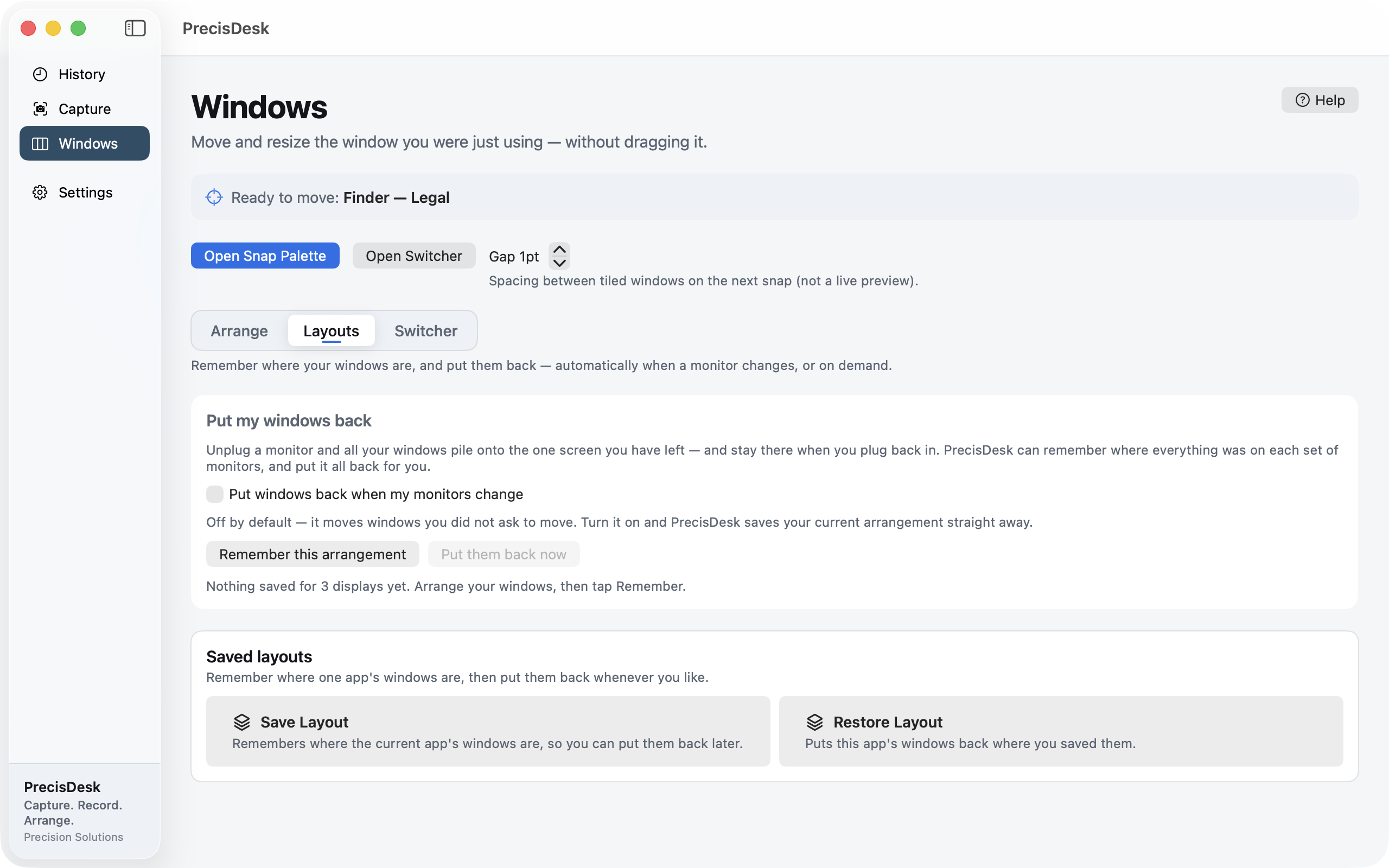
What it's for
This is the one macOS still has no answer for. Unplug the monitor, all your windows crowd onto the screen you have left. Plug it back in, and they stay crowded. Everyone who docks a laptop rebuilds their layout by hand, several times a day, forever.
PrecisDesk fingerprints the set of displays you are currently using and remembers where your windows sit on it. Change monitors and it recognises the new arrangement; come back to one it has seen before and it can put everything back where it was.
It is off by default, deliberately — it moves windows you did not ask it to move. Turn it on and it saves your current arrangement immediately.
How to use it
-
Open the Layouts page
In the Windows tab, switch to Layouts.
-
Turn on restore-on-change
Switch on Put windows back when my monitors change. PrecisDesk saves your current arrangement straight away, so there is something to come back to.
-
Carry on working
Every set of displays gets remembered separately — desk with two monitors, laptop on its own, the projector in the meeting room.
-
Plug and unplug
When a display set you have used before comes back, your windows go back with it.
-
Or do it by hand
Remember this arrangement and Put them back now work on demand, if you would rather it never moved anything automatically.
How it recognises a setup
PrecisDesk fingerprints the displays that are attached — their arrangement and size — rather than the order macOS happens to report them in. Plugging the same monitors back into different ports still matches.
Saved layouts, per app
- Save where one app's windows sit and restore them later
- Layouts are kept per display setup, so the desk and the laptop do not overwrite each other
- Nothing moves until you turn it on or ask for it
Common questions
Does it move my windows without asking?
Not unless you turn it on. Automatic restore ships switched off, precisely because it moves windows you did not ask it to move. The manual buttons are always there instead.
Does it handle more than one monitor setup?
Yes. Each distinct set of displays is remembered separately, so docking at your desk and plugging into a projector do not overwrite each other.
Can macOS not already do this?
No. This is the gap PrecisDesk was built to fill — macOS has never restored window positions across a display change.
Try it on your own files
PrecisDesk is a one-time $9.99 purchase — no subscription, no account, and nothing leaves your Mac. Requires macOS 14+.